Convert-As-You-Type Currency Conversion in Swift: Decimal Maths, Cached Rates and Locale-Aware Formatting
Originally published at https://bestlatestapps.com/blog/convert-as-you-type-currency-conversion-in-swift/
Why Double is the wrong type for money, how to derive any cross rate from one base, keeping rates fresh without a refresh button, and formatting 150+ currencies correctly

A currency converter is used at the worst possible moments: at a market stall abroad, at a checkout page in another currency, in a taxi with a meter running. Nobody wants to tap "Convert". Nobody wants a spinner. And nobody wants to see 0.30000000000000004 on the screen.
Currency Converter : Fast is one of my first apps, published in April 2020. Its listing describes the whole philosophy in a few lines: 150+ currencies, "converts as you type (no need for a 'Convert' button!)", exchange rates "updated automatically — you don't have to do anything!", and 3 decimal places "for greater accuracy".
Each of those promises maps onto a specific technical decision: the number type, the rate model, caching and refresh, and formatting. This article goes through how I'd build each one in Swift. API names and availability are checked against Apple's documentation. I describe the approach I'd use rather than the app's internals, and I deliberately don't name a rate provider: the listing doesn't, and the design is the same whichever one you use.
1. Money is not a Double
Binary floating point can't represent most decimal fractions exactly. 0.1 + 0.2 isn't 0.3, and after a few multiplications by exchange rates, the error shows up in exactly the decimal places you're displaying.
Foundation's Decimal is a base-10 number type, so 0.1 really is 0.1:
import Foundation

let a: Double = 0.1 + 0.2
print(a)                                  // 0.30000000000000004

let b = Decimal(string: "0.1")! + Decimal(string: "0.2")!
print(b)                                  // 0.3
The rule I follow: amounts and rates are Decimal from the moment they enter the app, whether that's the user's typing or the JSON from the rates API, until the moment they're formatted for display. Two gotchas:
Decimal(0.1)converts from a Double, so the binary error comes with it. Initialise from strings:Decimal(string:locale:).JSONDecoderdecodesDecimalfields viaDoubleinternally on some systems, which can reintroduce error in the last digits. If exactness matters, decode rates asStrings and convert them yourself, as below.
2. One base, every cross rate
You don't need a 150 × 150 table. Fetch every currency's rate against one base (say USD), and derive any pair:
amount_in_B = amount_in_A × (rate_B / rate_A) where rate_X = units of X per 1 base
import Foundation

struct RateTable: Codable {
    let base: String                     // "USD"
    let rates: [String: Decimal]         // "EUR": 0.92 means 1 USD = 0.92 EUR
    let fetchedAt: Date

    func rate(from: String, to: String) -> Decimal? {
        guard let a = from == base ? 1 : rates[from],
              let b = to == base ? 1 : rates[to],
              a != 0 else { return nil }
        return b / a
    }

    func convert(_ amount: Decimal, from: String, to: String) -> Decimal? {
        rate(from: from, to: to).map { amount * $0 }
    }
}

// Decode rates exactly: the API sends numbers, but we read them as strings first.
struct RatesResponse: Decodable {
    let base: String
    let rates: [String: Decimal]

    private enum CodingKeys: String, CodingKey { case base, rates }

    init(from decoder: Decoder) throws {
        let c = try decoder.container(keyedBy: CodingKeys.self)
        base = try c.decode(String.self, forKey: .base)
        // Assumes the provider sends rates as JSON strings; if it sends numbers,
        // decode [String: Double] and convert via "\(value)" to limit binary error.
        let raw = try c.decode([String: String].self, forKey: .rates)
        rates = raw.compactMapValues { Decimal(string: $0, locale: Locale(identifier: "en_US_POSIX")) }
    }
}
RateTable.rate(from:to:) is also how you show "the current exchange rate of what you're converting", one of the listing's features: 1 EUR = 1.087 USD, computed from the same table.
Note the en_US_POSIX locale when parsing API data. API numbers always use . as the decimal separator, whatever the user's device language is.
3. Convert as you type
With Decimal maths and a local rate table, conversion is instant and synchronous. There's no reason for a button. In SwiftUI:
import SwiftUI

@MainActor
final class ConverterModel: ObservableObject {
    @Published var input = ""
    @Published var from = "USD"
    @Published var to = "EUR"
    @Published private(set) var table: RateTable?

    private let parser: NumberFormatter = {
        let f = NumberFormatter()
        f.numberStyle = .decimal
        f.generatesDecimalNumbers = true   // parse straight to NSDecimalNumber, never via Double
        f.isLenient = true
        return f
    }()

    var amount: Decimal? {
        (parser.number(from: input) as? NSDecimalNumber)?.decimalValue
    }

    var result: Decimal? {
        guard let amount, let table else { return nil }
        return table.convert(amount, from: from, to: to)
    }

    func swap() { (from, to) = (to, from) }
}

struct ConverterView: View {
    @StateObject private var model = ConverterModel()

    var body: some View {
        Form {
            Section {
                TextField("Amount", text: $model.input)
                    .keyboardType(.decimalPad)
                    .font(.largeTitle.monospacedDigit())
                CurrencyPicker(title: "From", code: $model.from)
            }
            Section {
                Text(model.result.map { CurrencyText.format($0, code: model.to) } ?? "—")
                    .font(.largeTitle.monospacedDigit())
                    .contentTransition(.numericText())          // iOS 17: digits roll smoothly
                    .animation(.snappy, value: model.result)
                CurrencyPicker(title: "To", code: $model.to)
            }
            Button("Swap", systemImage: "arrow.up.arrow.down", action: model.swap)
        }
    }
}
Because result is a computed property, every keystroke recomputes it: there's no debounce and no task. CurrencyPicker is a searchable list of codes (section 5).
The decimal-pad keyboard shows the user's locale separator, and the NumberFormatter uses Locale.current by default, so "12,50" in Germany and "12.50" in the US both parse.
4. Rates that update themselves, and work offline
"Exchange rates are updated automatically" has three parts: a cache that's always there, a refresh when the app comes to the foreground, and an occasional refresh in the background.
import Foundation

actor RateStore {
    static let shared = RateStore()
    private let fileURL: URL = FileManager.default
        .urls(for: .cachesDirectory, in: .userDomainMask)[0]
        .appendingPathComponent("rates.json")
    private let maxAge: TimeInterval = 60 * 60          // refresh if older than an hour

    /// Always returns something if we've ever succeeded, even offline.
    func cached() -> RateTable? {
        guard let data = try? Data(contentsOf: fileURL) else { return nil }
        return try? JSONDecoder().decode(RateTable.self, from: data)
    }

    func refreshIfStale(force: Bool = false) async -> RateTable? {
        if !force, let c = cached(), Date().timeIntervalSince(c.fetchedAt) < maxAge { return c }
        do {
            var request = URLRequest(url: URL(string: "https://rates.example.com/latest?base=USD")!)
            request.timeoutInterval = 10
            let (data, response) = try await URLSession.shared.data(for: request)
            guard (response as? HTTPURLResponse)?.statusCode == 200 else { return cached() }
            let decoded = try JSONDecoder().decode(RatesResponse.self, from: data)
            let table = RateTable(base: decoded.base, rates: decoded.rates, fetchedAt: Date())
            try JSONEncoder().encode(table).write(to: fileURL, options: .atomic)
            return table
        } catch {
            return cached()                                   // offline or failed: keep the last good table
        }
    }
}
Key behaviours:
- Show the cache immediately, then refresh. The UI never waits on the network.
- On failure, keep the last good table. A slightly old rate is far more useful than an error screen at a market stall.
- Show the age. "Rates updated 3 hours ago" in small text is honest, and it's the one piece of UI that explains a surprising number.
- Bundle a seed table in the app, so a first launch in Airplane Mode still converts. Label it with its date.
For background refresh, SwiftUI's backgroundTask(_:action:) scene modifier (iOS 16+) with .appRefresh pairs with BGAppRefreshTaskRequest (iOS 13+):
import SwiftUI
import BackgroundTasks

@main
struct CurrencyApp: App {
    @Environment(\.scenePhase) private var phase

    var body: some Scene {
        WindowGroup { ConverterView() }
            .onChange(of: phase) { _, newPhase in
                if newPhase == .active { Task { _ = await RateStore.shared.refreshIfStale() } }
                if newPhase == .background { scheduleRefresh() }
            }
            .backgroundTask(.appRefresh("rates.refresh")) {
                _ = await RateStore.shared.refreshIfStale(force: true)
                scheduleRefresh()
            }
    }
}

func scheduleRefresh() {
    let request = BGAppRefreshTaskRequest(identifier: "rates.refresh")
    request.earliestBeginDate = Date(timeIntervalSinceNow: 4 * 60 * 60)
    try? BGTaskScheduler.shared.submit(request)
}
Add rates.refresh to BGTaskSchedulerPermittedIdentifiers in Info.plist and enable Background Modes → Background fetch. Remember that earliestBeginDate is a floor, not a schedule: the system decides when, based on how the user actually uses the app. The foreground refresh is what really keeps rates fresh.
5. 150+ currencies: names, symbols and decimals
Foundation knows a great deal about currencies, so you don't have to maintain that list by hand:
import Foundation

struct CurrencyInfo: Identifiable, Hashable {
    let code: String
    var id: String { code }
    var name: String { Locale.current.localizedString(forCurrencyCode: code) ?? code }
}

enum CurrencyCatalog {
    /// Intersect what the rates API supports with what Foundation can name.
    static func available(in table: RateTable) -> [CurrencyInfo] {
        let common = Set(Locale.commonISOCurrencyCodes)          // iOS 16+
        return (Array(table.rates.keys) + [table.base])
            .filter(common.contains)
            .map(CurrencyInfo.init)
            .sorted { $0.name.localizedCompare($1.name) == .orderedAscending }
    }
}

enum CurrencyText {
    /// Three decimals, as the listing promises, with the locale's grouping and symbol.
    static func format(_ value: Decimal, code: String) -> String {
        value.formatted(.currency(code: code).precision(.fractionLength(3)))
    }
}

// CurrencyText.format(1234.5678, code: "EUR") → "€1,234.568" in en_US, "1.234,568 €" in de_DE
localizedString(forCurrencyCode:) gives "Colombian Peso" in English and "Peso colombiano" in Spanish for free. Decimal.FormatStyle.Currency (iOS 15+) handles the symbol, its position, grouping and the decimal separator for the user's locale.
About three decimal places: most currencies have two minor units, some have zero (JPY, KRW) and a few have three (KWD, BHD). Showing three everywhere is a deliberate product choice. It gives more precision on small amounts and on the exchange rate itself. If you'd rather respect each currency's standard, use .precision(.fractionLength(0...3)) with rounding, or read the currency's default fraction digits from a NumberFormatter set to .currency style.
Make the picker searchable by code and by name (.searchable(text:)), and put recently used currencies at the top. Most people convert between the same two or three currencies over and over.
6. Real-world example: Currency Converter : Fast
This is the approach I'd use, and recommend, for Currency Converter : Fast.
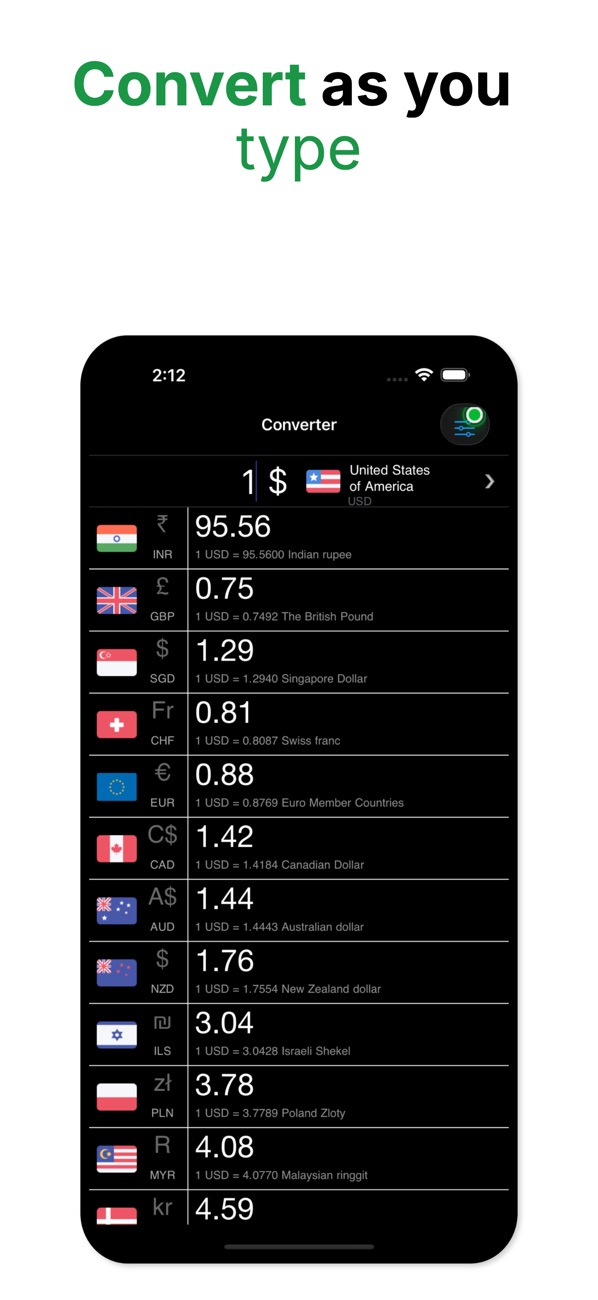
At the time of writing, its App Store listing shows:
- Free, in Finance and Productivity
- First released in April 2020
- 7 ratings in the US store, averaging about 4.7 stars
- Supports iOS 17.6 and later
How the listing's features map to this article:
| What the listing says | Where it's covered |
|---|---|
| "Over 150 currencies supported" / "from the US Dollar to the Colombian Peso" | One-base rate table plus Foundation's currency names (sections 2, 5) |
| "Converts as you type (no need for a 'Convert' button!)" | Synchronous Decimal conversion as a computed property (section 3) |
| "Exchange rates are updated automatically – you don't have to do anything!" | Cache-first store, foreground refresh, background app refresh (section 4) |
| "Uses 3 decimal places for greater accuracy!" | Decimal maths and .precision(.fractionLength(3)) (sections 1, 5) |
| "Find the current exchange rate of what you're converting" | RateTable.rate(from:to:) (section 2) |
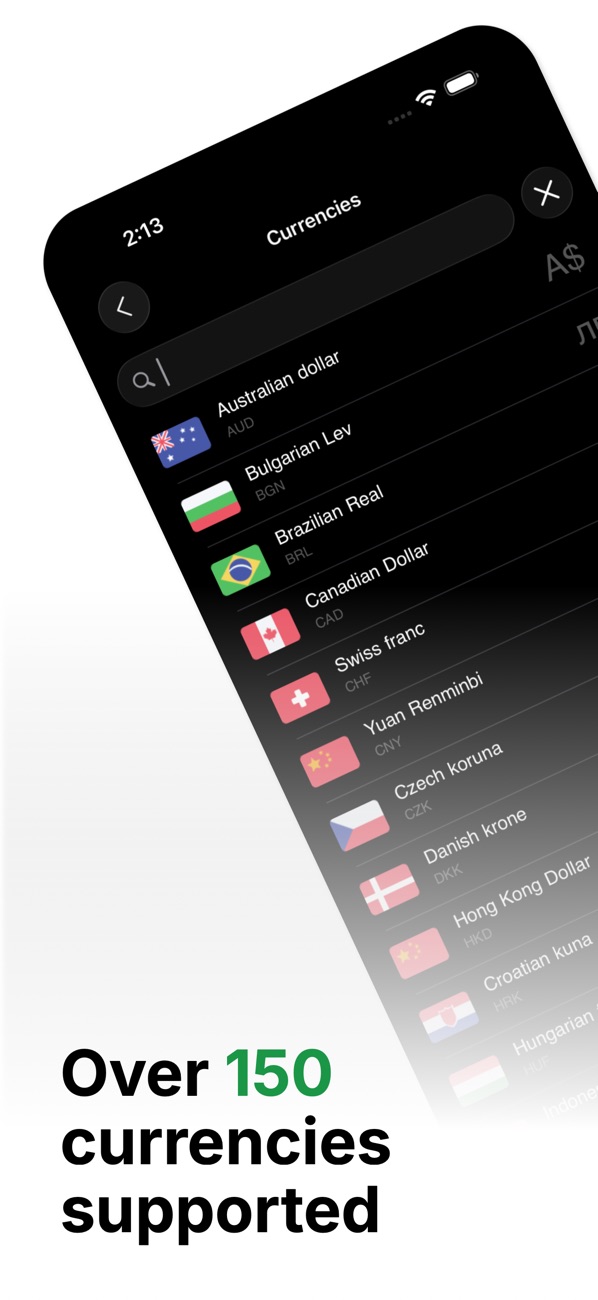
Because the app targets iOS 17.6 and later, everything above, including contentTransition(.numericText()), the two-parameter onChange and the SwiftUI background task, is available without availability checks.
7. Before you ship a currency converter: a checklist
Decimalend to end. NoDoublebetween parsing and formatting, and noDecimal(someDouble).- API numbers are parsed with
en_US_POSIX, and user input with the user's locale. - Cross rates come from one base. Test that A → B → A returns the original amount, within rounding.
- The cache is shown first. Launch in Airplane Mode: you see the last rates and their age, not an error.
- A seed table ships in the bundle for first-launch offline use.
- Background refresh is configured (permitted identifiers, background mode), and foreground refresh does the real work.
- Formatting is tested in several locales: en_US, de_DE, fr_FR, ja_JP and ar, at least.
- Zero-decimal and three-decimal currencies look right, according to your product decision.
- Rates are labelled honestly. These are indicative mid-market-style rates, not what a bank or card will charge.
Wrapping up
The "fast" in a fast currency converter isn't about network speed. It's about never needing the network at the moment of use. Keep money in Decimal, derive every pair from one cached base table, refresh quietly in the foreground and background, and let Foundation handle names, symbols and locale formatting. The result converts as you type, anywhere, even in Airplane Mode.
Try it, or explore my other apps:
- Currency Converter : Fast (iOS): https://apps.apple.com/us/app/currency-converter-fast/id1509291290
- All of my free iOS apps: https://apps.apple.com/us/developer/alok-singh/id1508795536
- My portfolio: https://bestlatestapps.com/alok/
How do you handle money in Swift: Decimal, integer minor units, or a library? I'd love to hear the trade-offs you've found in the comments.
— Alok Kumar Singh
Originally published at https://bestlatestapps.com/blog/convert-as-you-type-currency-conversion-in-swift/